Review bank CSVs.
Hand over the work.
For bookkeeping offices preparing Xero imports. Keep each client’s review separate, resume it later and deliver the checked files together.
Free: 20-line preview and complete HTML review dossier. No account.
Office · £99 / 12 months
One office, up to 3 users. Full local CSV exports, multi-statement handover and maintenance. GBP total, taxes included; no automatic renewal.
Download the paid handover sample · HTML. Separate full CSVs, dossiers and client index in one delivery.
14-day full refund, even after use. Key on the return page after payment confirmation.
A reviewed statement, ready to inspect
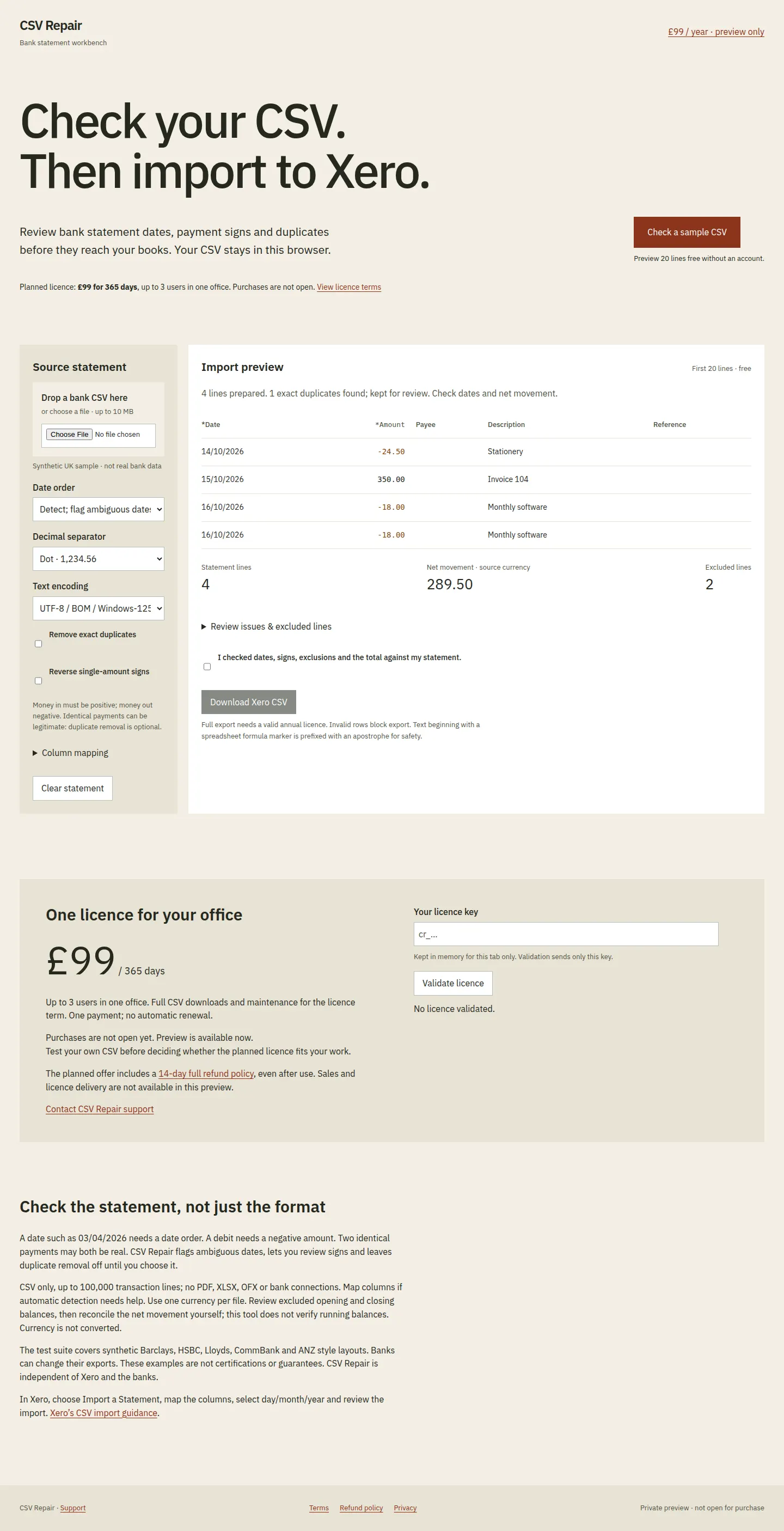
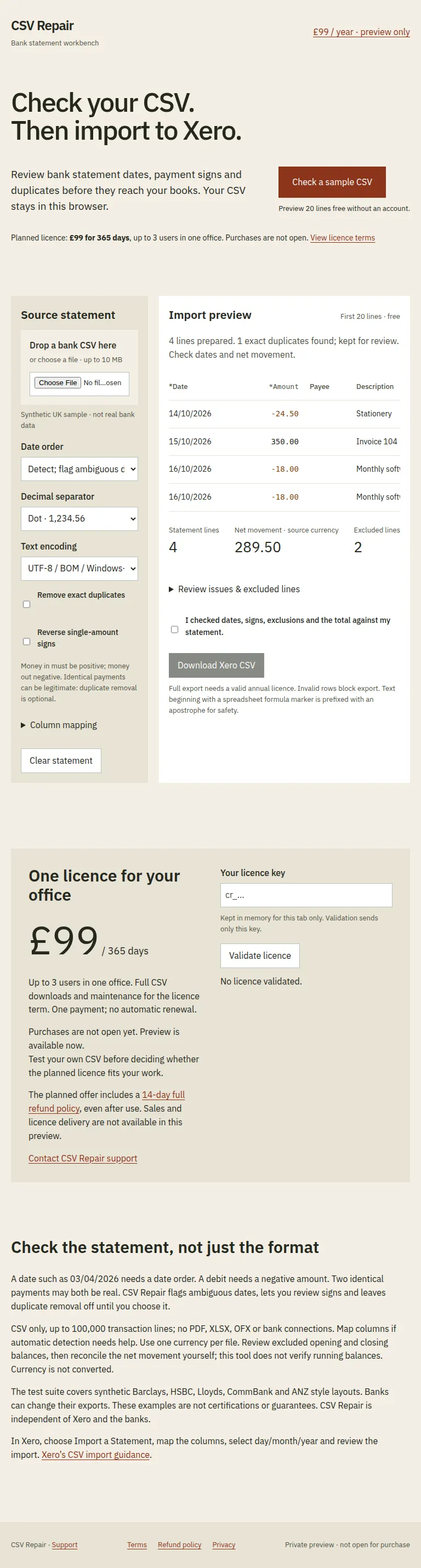
Synthetic sample from the actual export engine. Two identical payments are kept until you choose otherwise.
| Date | Description | Amount |
|---|---|---|
| 14/10/2026 | Stationery | −24.50 |
| 15/10/2026 | Invoice 104 | 350.00 |
| 16/10/2026 | Monthly software | −18.00 |
| 16/10/2026 | Monthly software | −18.00 |
| Net movement · source currency | 289.50 | |
4 transactions retained. Opening and closing balance records excluded. Check these decisions against your source statement.
Inspect the complete 25-line dossier
Download the 25-line dossier sample CSV
Complete review dossier: every source record and prepared transaction. Full exports require a valid licence and your review.
Import preview
First 20 lines · freeChoose a CSV or try the synthetic sample to inspect the repaired statement.
| *Date | *Amount | Payee | Description | Reference |
|---|---|---|---|---|
| Your statement preview will appear here. Nothing is sent to a server. | ||||
Review issues & excluded lines
- No statement loaded.
Balance check & review closure
Supply both balances for arithmetic comparison only.
Record decisions for flagged rows
Office handover · licensed
Finish the queue in one delivery file: a client index, separate full Xero CSVs and complete review dossiers. Every statement must pass validation and your review. No merging across clients.
Review each queued statement, then build your handover. Your licence is checked online; statements stay local.
The free HTML dossier includes all transactions, source records, decisions, balance check and review closure; print it to PDF in your browser. Full CSV export needs a valid annual licence. Invalid rows block export. Text beginning with a spreadsheet formula marker is prefixed with an apostrophe for safety.
Office licence · £99 for 365 days
One office, up to 3 users. Full CSV exports, multi-statement handover and maintenance. One payment; no automatic renewal.
Use your licence
Enter an Office, Firm master or client key to unlock full CSV downloads. Your bank statement stays in this browser; only the key is sent for validation.
Firm administrators can issue and manage client keys below. Save your master key securely after confirmed payment.
Contact CSV Repair supportKept in memory for this tab only. Validation sends only this key.
No licence validated.
One handover. Each client’s files kept separate.
The Office licence turns your reviewed queue into an offline HTML delivery. Open the client index, download each full Xero CSV and inspect its complete dossier: source records, decisions, hashes, balance comparison and reviewer notes.
Download the real two-client handover sample. Open the downloaded HTML in your browser to inspect both CSVs and dossiers. Synthetic data generated by the workbench; no licence needed.
- Test for free
- Review your own CSV, save mappings, queue statements, save and reopen a project, and download complete individual HTML dossiers.
- Office · £99 for 365 days
- Full Xero CSV downloads, one handover file for the reviewed queue and maintenance. Up to 3 users in one office. One payment; no automatic renewal.
Save the project before closing the tab. Reopened statements need fresh confirmation before export. Project and handover files contain financial data: keep them private. No cloud archive, automatic reconciliation or merged client accounts.
Buy Office · £99See the workbench
Real product captures using synthetic transactions, never customer statements.

Check the statement, not just the format
A date such as 03/04/2026 needs a date order. A debit needs a negative amount. Two identical payments may both be real. CSV Repair flags ambiguous dates, lets you review signs and leaves duplicate removal off until you choose it.
CSV only, up to 100,000 transaction lines; no PDF, XLSX, OFX or bank connections. Map columns if automatic detection needs help. Use one currency per file. Review excluded opening and closing balances, then reconcile the net movement yourself; this tool does not verify running balances. Currency is not converted.
The test suite covers synthetic Barclays, HSBC, Lloyds, CommBank and ANZ style layouts. Banks can change their exports. These examples are not certifications or guarantees. CSV Repair is independent of Xero and the banks.
In Xero, choose Import a Statement, map the columns, select day/month/year and review the import. Xero’s CSV import guidance.
Manage client keys
Firm only. Save the master key shown after payment, then issue client keys here. The response contains the key and expiry: save it securely. Use the same reference to recover its key. Revocation blocks that key; issuing it again restores access. Up to 25 distinct client references per annual licence. Never share the master key with clients. No manual onboarding.